The Imixs-BPMN Modeler - User Guide
Imixs-Workflow is based on the Business Process Model and Notation (BPMN 2.0). You can create a BPMN Model with Imixs-BPMN, a free modelling tool. Imixs-BPMN takes the full advantage of all the capabilities from the BPMN standard and complements them with the requirements to a workflow management system. Imixs-BPMN is based on the Open Source project Open-BPMN and extends this framework with the aspects of a human-centric workflow model executable on the Imixs-Workflow Engine.
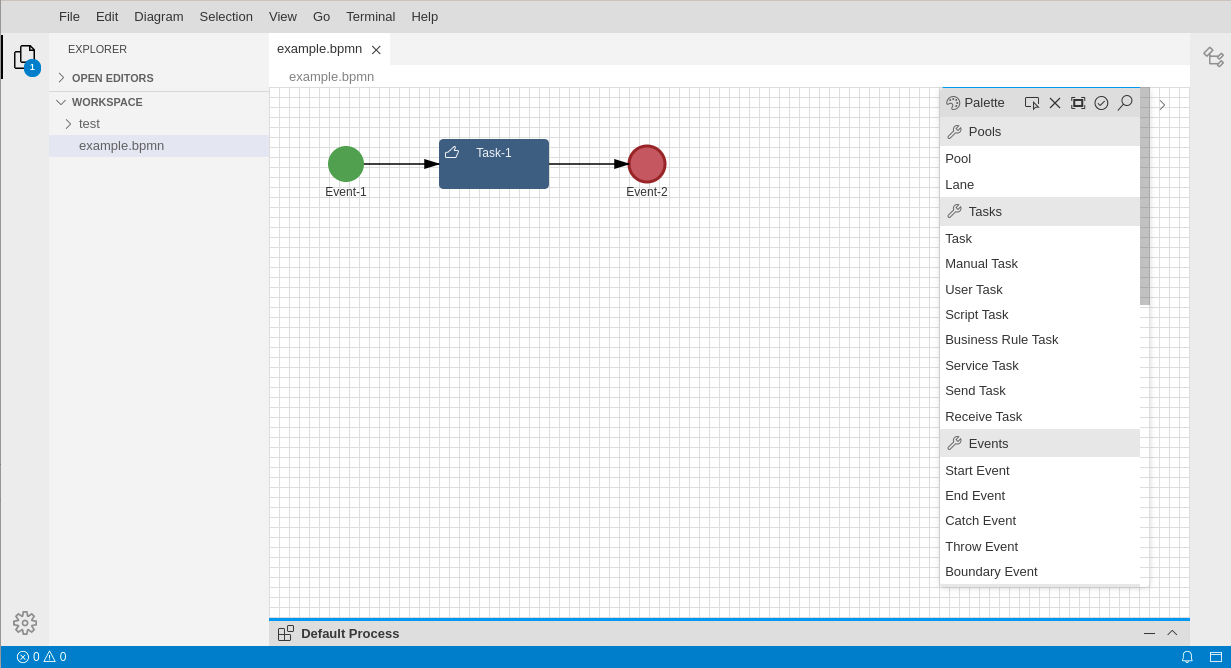
To install Imixs-BPMN please see the Installation Guide.
Overview
A BPMN Model can be created simply be creating a new file with the file extension .bpmn.
As shown in the screenshot, Imixs-BPMN provides all of the BPMN features in a Tool Palette at the right side of the editor panel. The Drawing Canvas in the main area of the editor window is used to place the BPMN elements into the model.
BPMN elements can be placed on the canvas by selecting them from the Tool Palette and clicking anywhere on the canvas. Elements can be moved on the canvas and connected (with, e.g. Sequence Flows, Associations, Data Flows, etc.) by selecting a connection tool from the palette and then first clicking the source element.
The Tool Palette
The Tool Palette is, by default, located along the right edge of the Drawing Canvas. It consists of several standard BPMN2 elements that can be dragged onto the Drawing Canvas. The Imixs-BPMN plug-in provides a separate section called “Imixs-Workflow”. This category contains the extension which allows you to annotate a BPMN Task or a Catch Event. The extension can be dragged like any other BPMN element onto a Task or Catch Event.
Property Panel
On the bottom of the Drawing Canvas you have a property panel to edit the details of a BPMN element. To open the property panel you can double click an element or use the expand icon on the left side of the property panel header.

The Workflow-Task

The “Workflow-Task” is used to describe a Task inside a process model controlled by the Imixs-Workflow engine. The Task Element typically reflects a task to be processed by a participant during the process life-cycle of a process instance. A Imixs Workflow-Task contains a custom set of properties used to describe the status of a process instance. Read more about the Task Element in the section Task Properties. The “Workflow-Task” Element is an extension to the BPMN 2.0 Element “Task”.
The Workflow-Event

The “Workflow-Event” is used to describe a transition from one Task into another. The Event Element contains a custom set of properties to be evaluated during the execution by the Imixs-Workflow engine. Read more about the Event Element in the section Event Properties. The “Workflow-Event” is an extension to the BPMN 2.0 Intermediate CatchEvent.
The Pools
You can place BPMN elements directly on the Drawing Canvas or into a BPMN Pool element. BPMN Pools are used to group different worklfow groups into one model.

The Imixs Workflow Extension
To adapt a Task or Event element to be processed by the Imixs-Workflow Engine you need to add the extension from the Tool Palette to a Task or Catch Event:

This will extend the corresponding BPMN element with additional Properties used by the Imixs Workflow engine during the processing cycle. An BPMN element which is not annotated with the Imixs-Workflow extension will be ignored during the processing life-cycle.
You can recognize the extension by the additional yellow border of the element and by the additional properties in the property panel.
What's Next…
Read more about Imixs BPMN:
Documentation
Core Concepts
Building Applications
Operations
Project
Community
